Liner
See the songs. Shape the release.
Ownership
Solo Designer & Developer
Team
Solo
Primary proof
Web app
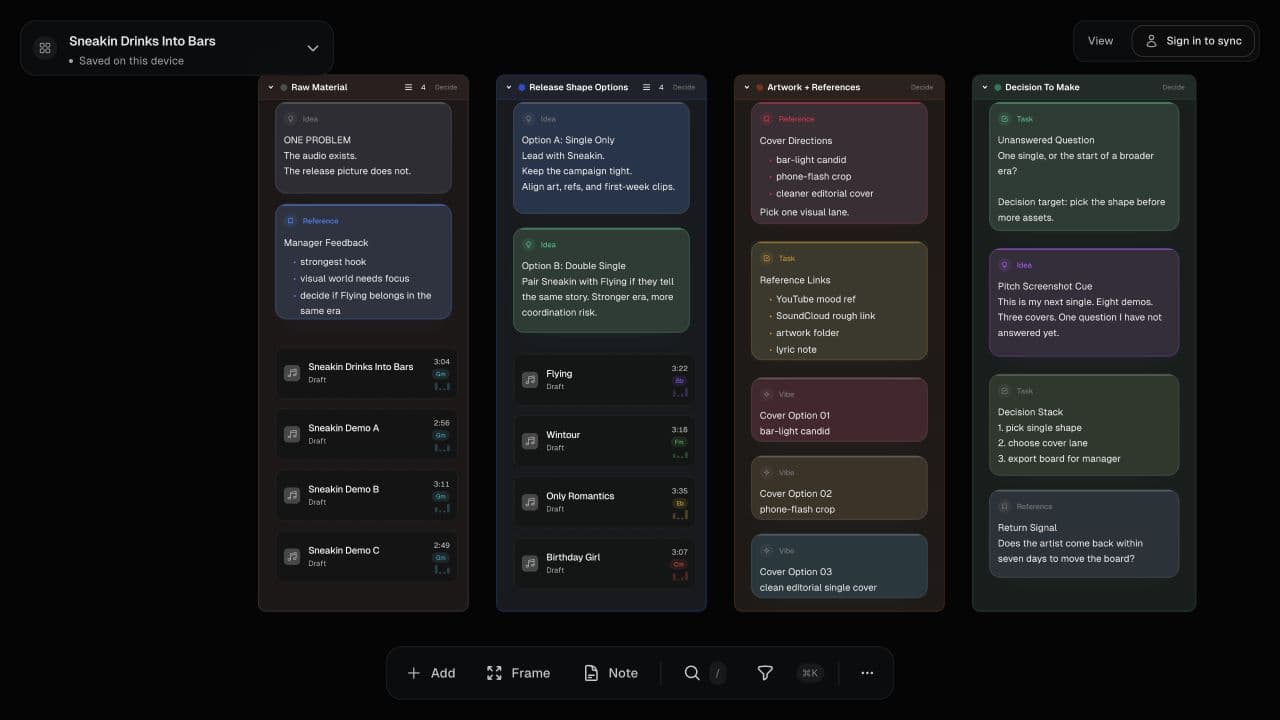
Overview
Liner is a visual workspace for organizing songs and planning releases. I designed and built it around the work between making music and putting it out: collecting demos, keeping references and feedback nearby, trying track orders, and deciding what belongs to the record. This case study covers the web app. The pictured release board is a public demo; its notes and alternate tracks are illustrative.
The Challenge
A record takes shape across audio files, playlists, lyric scraps, references, and conversations. A folder keeps the files together, but does not show how the songs relate or which decisions are still open. Liner gives that material a shared visual space, with listening and editing close at hand.
Constraints
- •Canvas selection, pan, zoom, text editing, and playback share the same workspace and need clear interaction boundaries.
- •Local work needs its own save status; a successful metadata write must not hide a failed canvas write.
- •Cloud sync is optional. Lossless masters stay local; eligible compressed audio can upload when cloud sync is used.
How it works
Problem
Songs and notes were scattered across storage and separate planning tools.
Decision
Keep songs, notes, references, and grouping frames on one canvas, backed by a custom HTML engine.
Direct spatial editing requires explicit selection, drag, resize, history, and persistence behavior.
Impact
Arrangement and annotations can be viewed together without moving to a separate planning document.
Problem
Listening and editing have competing keyboard and selection needs.
Decision
Pair interactive song cards with waveform playback, a queue, and keyboard controls while retaining clear editing boundaries.
Playback state and text input need coordination across the canvas and song panel.
Impact
The track order can be considered alongside notes and references while the music is playable.
Problem
A workspace can appear saved even when one browser-storage destination fails.
Decision
Track metadata and canvas save states independently, flush pending canvas saves when the page is hidden, and expose an export-backup action when local saving fails.
Browser storage still has limits; an export recovery path is needed rather than a promise of permanent storage.
Impact
The interface can tell the person when current edits are not saved.
Approach
1. Bring the project into view
Import audio or paste references, arrange songs into frames, and keep the note that explains a decision beside the material. The custom HTML canvas supports pan, zoom, selection, and direct editing.
2. Hear the sequence while you work
Song cards connect waveform extraction and playback with the working board. A playback queue and timeline view support trying an order without reducing the project to a list of filenames.
3. Keep the work recoverable
Board metadata and canvas layout persist locally; audio is cached in IndexedDB. Saving is reported by destination, with an export path for failures. Optional cloud sync extends that local workflow rather than being required to start.
Outcome
A web workspace that brings song arrangement, annotation, sequencing, and playback into one interface, with explicit local-save states and an export recovery path.
Proof points
Web app
Platform
Custom HTML engine
Canvas
Local-first
Persistence
Learnings
- →Spatial editing needs explicit boundaries between selection, text input, and playback.
- →Local-first work needs honest failure states as well as a happy-path save indicator.
- →The strongest demonstration is a real musical decision, with the songs and context visible.
Anti-Patterns Avoided
- ×Making an account a prerequisite for organizing a local project.
- ×Forcing every musical decision into a single linear playlist.
- ×Hiding failed canvas saves behind a successful metadata write.
Next Iterations
- →A short walkthrough of a public release board, showing arrangement, annotation, and listening together.
- →Clearer collaboration and sync states for shared music workspaces.
Get In Touch
If you want to talk about similar work, email me.
Contact is the simplest place to start.
Next project
Whakapapa