Margin
Catch it without breaking flow, then hand agents the evidence
Ownership
Designer & Developer
Primary proof
Private personal tool
Overview
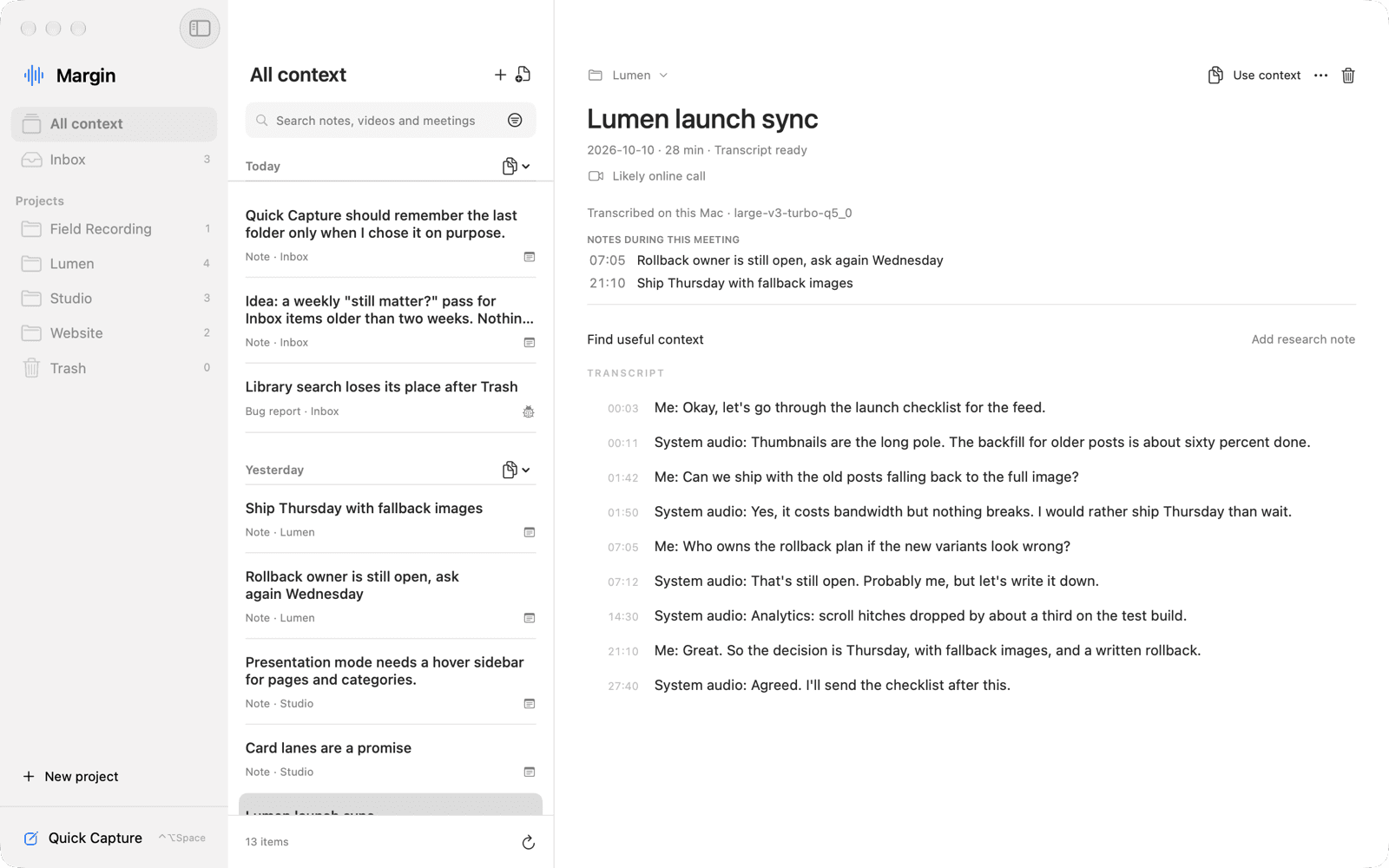
I designed and built Margin as the capture layer of my agent-assisted workflow. One shortcut opens a small floating panel for a note, a bug, a link or a meeting recording. Everything lands in an Inbox, gets sorted into a project when I am ready, and stays on my Mac. Coding agents can then search and quote it through a read-only interface. The screenshots show the real app running as a separate demo instance with a fictional library.
The Challenge
The useful thought usually arrives while I am in the middle of something else: an idea during a demo, a bug while testing, a decision on a call. If capturing it means choosing a folder, writing a title or switching apps, I lose either the thought or the flow. Later, when an agent picks up the work, it needs the original words, not my paraphrase of them.
Constraints
- •Capture must work with no network, no model and no setup decisions.
- •Private notes and recordings stay on the Mac unless I explicitly send them.
- •Agents may read; saving, moving, deleting and handing off stay human actions.
How it works
Problem
Choosing a destination before saving slows capture down.
Decision
Inbox is a real destination. A matching project is offered as a suggestion that waits for a click; an explicit #project tag files directly.
Sorting becomes a separate step, so the Inbox has to stay cheap to empty.
Problem
Notes typed during a meeting lose their link to what was being said.
Decision
A note saved while recording keeps the recording and the second it was written. The meeting lists those notes at their time, and each note links back.
The anchor is fixed at save time; editing a note never moves it.
Problem
Agents need context but should not be able to change it.
Decision
A read-only MCP server and a JSON CLI share one lookup path, with exact text, hashes and explicit coverage limits.
Agents can quote and cite, but every write still goes through me.
Problem
An agent-facing command that defaults to recording is a trap.
Decision
The canonical command never opens the microphone without an explicit verb; only the legacy alias used by a hotkey keeps its old toggle.
Two command names behave slightly differently, which is documented.
Approach
1. One shortcut, one field
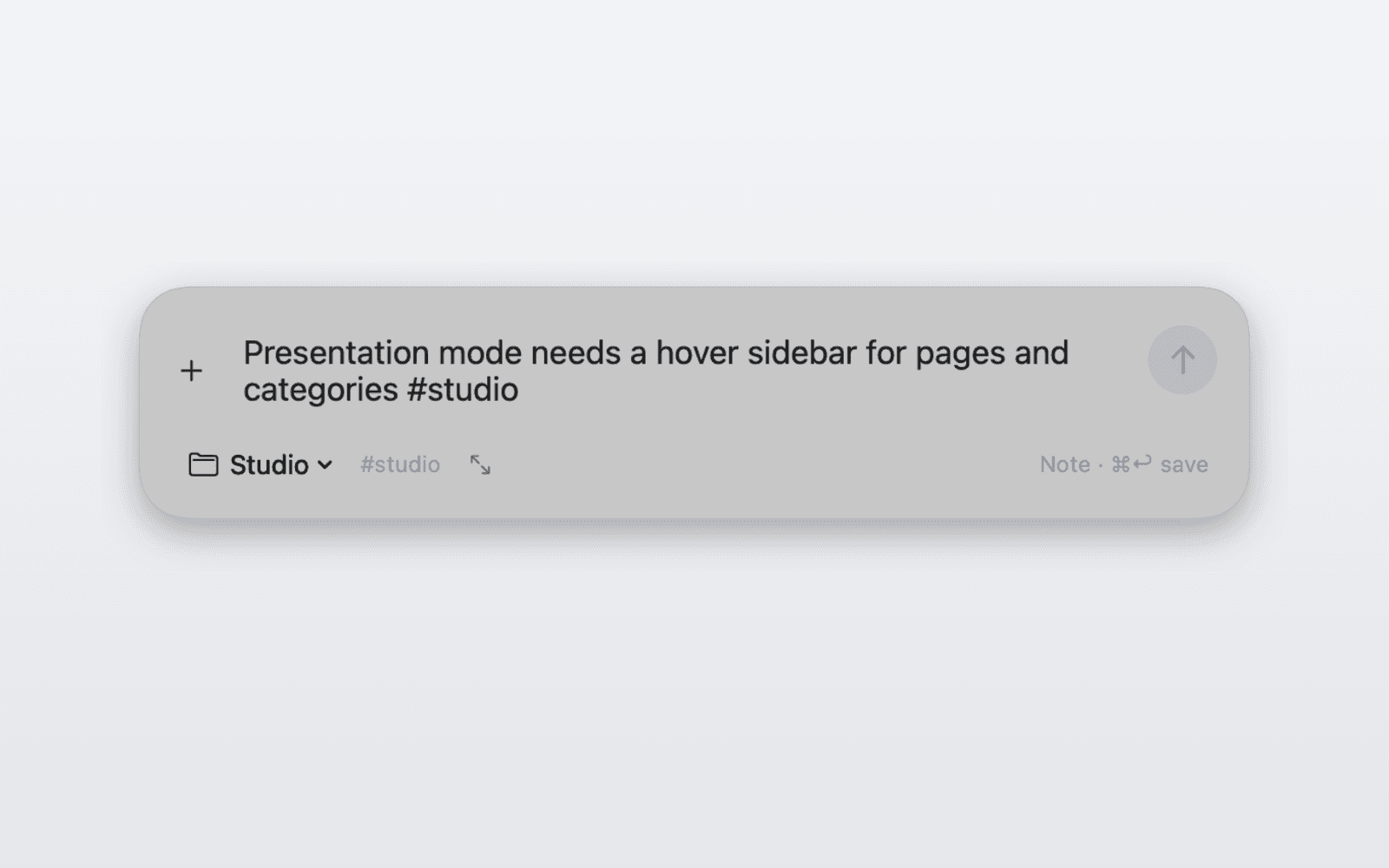
⌃⌥Space opens a nonactivating panel over whatever I am doing. Type or paste, press ⌘Return, keep going. A save can be undone for a few seconds, and drafts survive hiding the panel or restarting.
2. Meetings with notes in the margin
Microphone and system audio are recorded on separate tracks and transcribed on the Mac with whisper.cpp. Notes written during the call are anchored to that moment, so the meeting shows what I flagged and when.
3. Context agents can cite
Projects, notes, meetings, documents and saved video transcripts are available to agents through a read-only MCP server and CLI. Results include exact source text, SHA-256 hashes, dates and what was left out, so an answer can be checked against its source.
4. Trust before features
Backups are verified with checksums, restores go into a new folder with outgoing actions paused, Trash is reversible, and a separate demo instance keeps testing and screenshots away from the personal library.
Outcome
A tool I use on my own Mac, with about 1,500 saved sources so far. The capture, library, backup and agent-access paths have automated coverage (249 tests plus native UI checks). Real-call transcription accuracy, wider hardware coverage and a signed public release are still open; this case study does not claim a distributed product.
Proof points
Private personal tool
Delivery
Read-only MCP server and CLI
Agent access
Separate demo instance, fictional library
Screenshot data
Learnings
- →Fast capture is mostly about what you don't ask the user to decide.
- →An agent interface needs a safe default more than it needs more commands.
- →A note's moment in a meeting is context worth keeping.
Anti-Patterns Avoided
- ×Asking for a folder or title before saving
- ×Background screen or clipboard collection
- ×Agents that can quietly create tasks or edit sources
Next Iterations
- →Jump from an anchored note straight to that moment in the transcript
- →Keyboard-first Inbox review
- →A reviewed, notarized build for other Macs
Get In Touch
If you want to talk about similar work, email me.
Contact is the simplest place to start.
Next project
Autobahn extensions